Why do I need audiences?
The basic premise of an optimized user experience is that page visitors have differing needs and expectations. So, delivering one site experience to everyone, leaves you with a website that doesn't truly resonate with anyone. By grouping your visitors into audiences you can tackle this problem and create targeted, personalized experiences.
What makes a 'good' audience?
Conceptually, audiences are groups of visitors who have something in common. When deciding on an audience you should keep two things in mind.
1. What's the reach?
To maximize the impact of experiences, your audience should have a high reach which is either defined by volume or value.
- Volume: The audience should be made up of a large enough percentage of your site’s visitors. Imagine you create a "visitors from LinkedIn" audience but those only make up 1% of your overall traffic - not enough to make an impact.
- Value: Alternatively, the audience should be made up of visitors who are extremely valuable and deserve a unique message.
2. Is this feasible?
You must be able to identify members of this audience. Unless is not a crystal ball, we don't magically know everything about your visitors. Creating audiences based on gender, age, job title, interest, and more can be valuable but remember that the data has to come from somewhere.
Ask yourself: can this audience be identified using the data and conditions provided by Unless? Can I provide the necessary data myself (e.g. by sending data through UTMs or the API)?
What audiences can I choose from?
- Default audiences are five pre-defined visitor segments: everyone, new visitors, returning visitors, visitors using a desktop device, and visitors using a mobile device. These audiences are available from the get-go and you can immediately start using them.
- Custom audiences are visitor groups that you compose yourself. For this, you can mix and match all available targeting conditions (read on for more on this topic).
How do I set up audiences?
In Unless you will find three types of targeting conditions: context, behavior, and profile. You can mix and match all available targeting conditions using and/or options.
Context
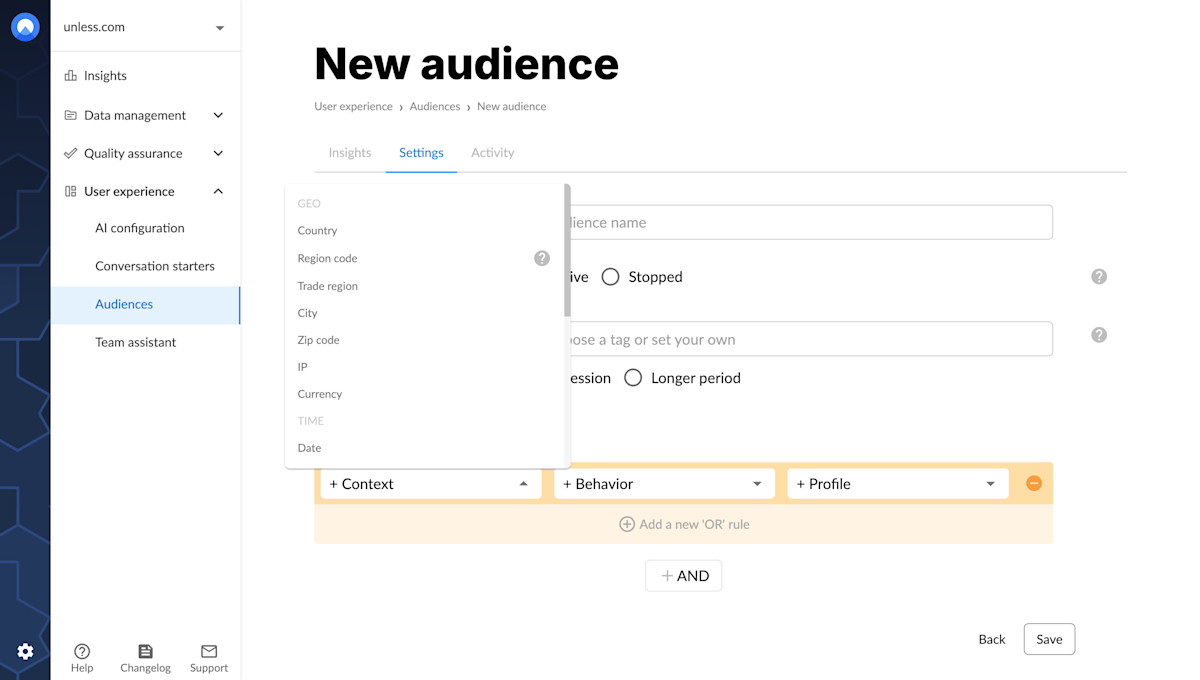
The first targeting condition we will look at is context. Under context you can define audiences based on:
- Geolocation: Increase relevance and trust by showing your visitors localized content. You can localize based on country, state, city, zip code, IP, or currency.
- Time: Show relevant content and special offers based on when someone visits your page. For example; "weekend visitors", "visiting outside office hours", "Christmas shoppers", and more.
- Device: Is your visitors' behavior influenced by device or browser? Do you want to change the CTAs on mobile view? These and more use cases can be covered with device-based audiences.
Behavior
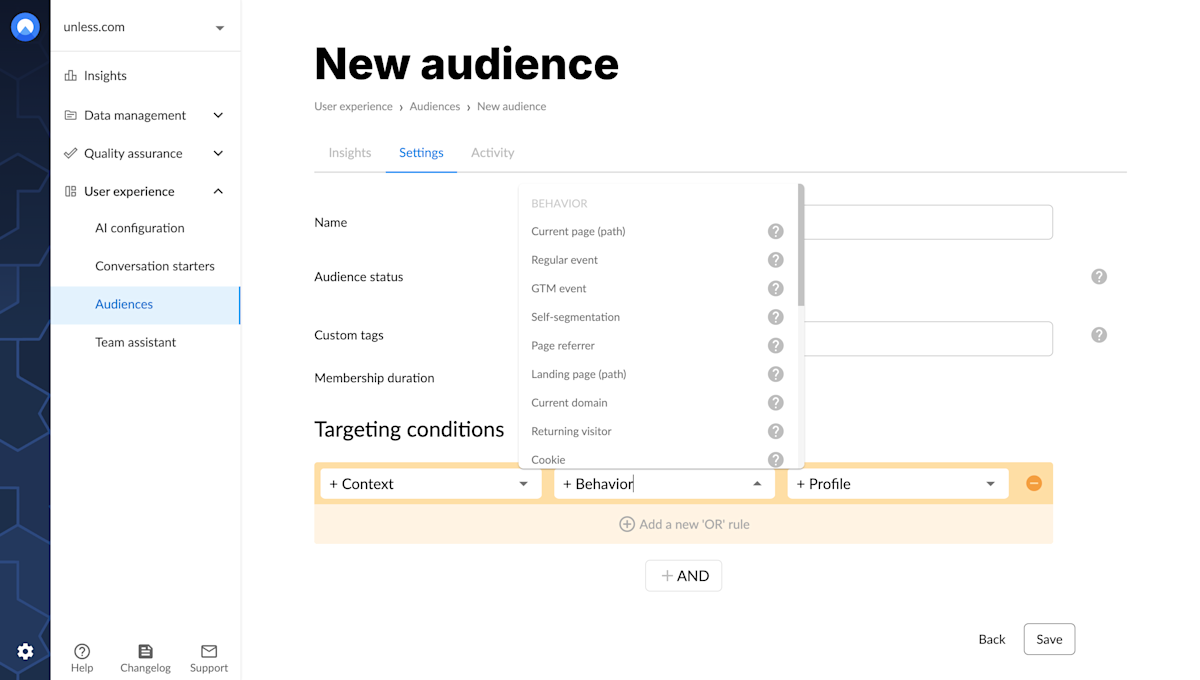
This category is a marketer's dream. Here you can set conditions based on where a visitor came to your website from, are they new or returning, did they accomplish any goals etc. as well as parameters which allow you to pass information from your campaigns to Unless.
- Behavior: Buttons clicked, pages viewed, PDFs read - through their behavior visitors tell you what they want and where they are in your conversion funnel - use this information for targeted messaging.
- Session: Define audiences based on the duration of visitors' web session or the number of pages they viewed.
- Parameter: URL parameters and UTMs transfer a lot of data from your marketing campaign to your website. With Unless, you can translate this data into a hyper-targeted website experience. For example, you can dynamically change the headline of your landing page based on the ad someone clicked. Imagine how much time that saves on landing page design!
Profile
Under the profile category, at first you will only have two default traits: email and identifier. There are also custom traits; personal visitor attributes such as name, gender, email, job, purchases, etc. that are unique to your account and business. These can be sourced through the API (set up by your developer). We also offer firmographic enrichment based on IP address. To learn more about this, please get in touch with us.
How to use and/or conditioning?
If you are just getting started with the and/or logic, it might be a little confusing at first. This setting indicates how many conditions have to apply so that a visitor becomes part of an audience:
Or: If any of the conditions apply to a visitor, they will become a part of the audience. Regardless of whether they match the other conditions or not.
And: Makes all conditions significant. A visitor will become part of the audience only if they match all the conditions.
Setting these up properly will make sure you target the right group of visitors. Usually, the and operator will create narrower, more specific audiences, while the or will allow you to create broader groups of visitors.
What is audience membership?
The membership duration defines how long a visitor remains part of an audience. You can set a time-based duration (in minutes, hours, or days) or limit the membership to the current web session. In general, your membership duration should be aligned with your sales cycle.
Example:
Let's say you run an ad campaign aimed at freelancers. Next, you create an audience and some experiences around it. By setting a membership duration you can influence how long Unless will identify visitors who clicked on the ads as freelancers.
- Session: Visitors will be identified as freelancers for the duration of their current web session. If they come back to your website tomorrow, they will no longer be part of your freelancer audience and see the original homepage.
- Longer Period: Visitors will become members of your freelancer audience for as long as you'd like - let's say 30 days. If they come back to your website in two weeks, a cookie recognizes them as freelancers and shows them the associated experiences.
How many audiences do I need?
It really depends on your website and your use case, there's no magic number. In general, we recommend to start with 2-3 broad audiences, once you get the hang of it and see some results, you can create more. To figure out which audiences to get started with, take a look at your Analytics data.